
Whatsapp is the most used and powerful messenger app, which is available for all platforms. Everyday it is including many features to improve its performance and popularity. Many of you already heard about the calling feature of it. In earlier, one must need root to enable that. However, now you can enable Whatsapp calling feature without root. Let’s know how to do that?

What is Whatsapp Calling?
Whatsapp is now integrated voice calling feature in it. This allows you to call any whatsapp contact over an Internet connection. Better Internet speed means, better voice clarity. I think; it is trying to compete with other social messengers, because maximum social apps have a voice call facility.
How to Enable Whatsapp Calling Feature
The calling feature is still not available for public use. Only developers can use this feature. If you’ll get an invitation from any other user, which has already activated this service, then suddenly a voice calling facility will activate on your phone.
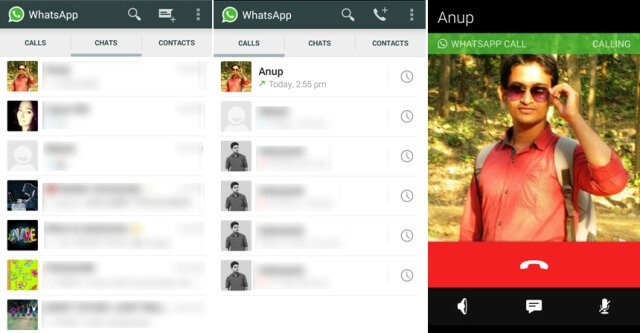
Invitation is nothing but a simple call from an already activated person. After activation you’ll see 3 columns in whatsapp; they are CALLS, CHATS, CONTACTS. After touching on a contact, you’ll see a call button on the top of the screen.
Minimum Requirements:
1) Latest version of Whatsapp
2) Android Operating System (2.1 or above)
3) Active Internet Connection
4) Tablets are not supported
If you don’t have the latest version, then update your Whatsapp from Google Playstore in order to enable this feature or you can download from the below link.
- After downloading, uninstall your previous version and re-install the new one.
- After Installation you need to find a user who already has the voice call feature activated.
- Ask him or her to call on your number.
- This will activate calling feature on your number. You can also do the same to enable this feature on your other contacts.
How to Call on Whatsapp

Tap on a contact, which you want to call. It’ll show you a call button on the top of the window. Tap on the call button. If it’ll show, “the contact needs to update the app to receive Whatsapp calls”, that means the contact has not the latest version. Tell him or her to update the app and try again.
Conclusion
This feature is currently not available for Windows and iOS devices. I have tried many times before, to enable Whatsapp calling feature on my Android mobile, and finally I got it today. If you are facing any problem regarding to this, then feel free to comment below.