There is a common problem with every mobile user, that sometimes we kept our mobile somewhere in our house and totally forget about that, and later we face much trouble to find it out. This is not a big task to solve, but to find a lost phone on silent mode is a major problem for anyone.

The easy way to locate a missing phone is, keeps calm and tries to memorize where you last saw it, or who you were discussing to the before you used it. Come back to that place and start your look for. Alternatively, you can call your carrier and ask them if they provide a GPS finding support for your cellphone. If you are not interested in long procedure, then try the below method.
Is it possible to Find a Lost Phone on Silent?
To find an ordinary phone may be impossible, but if you have a Smartphone like Android or iPhone, then you can easily get it. The only condition is that your Smartphone must be connected with a data connection or your home Wi-Fi network.
How to Find a Lost Android Phone on Silent
Android is one of the popular mobile operating systems and thanks to Google’s Android Device Manager, which helps to find a lost phone at your home. Let’s know how it works?
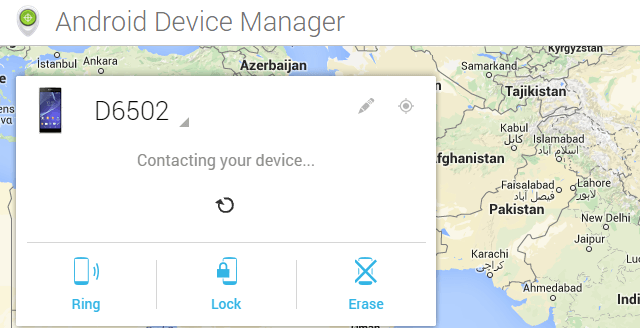
1) Open any browser on your computer and got to Android Device Manager Page.
2) Login with you the Gmail account, which is associated with your Android device.
3) After login, you’ll see the list of devices which are connected with your account.
4) Select the lost device and you’ll get Ring, Lock and Erase option.
5) Now click on “Ring” button and confirm the confirmation box.
6) You are done!
After few seconds, your device will ring at its full volume inspite of it being silent. Try to listen the ringtone and locate your lost phone easily.
You may Like: Stop Others from Using WiFi on Android
Android device manager is a free app by Google, which is available on Google Play Store and comes with preinstalled on every Android device. If you don’t have this app, then download it now. You can setup it by going Settings >> Security >> Device administrators.
How to Find Lost iPhone on Silent
Before locate a lost iPhone on silent, make sure that you had turned on “Find my iPhone” in your phone’s settings. If yes, then follow the below instruction.
1) Go to www.icloud.com on your computer and sign into your account.
2) Now click on “Find my iPhone” icon.
3) Click on “All Devices” in the center top and select your lost device which you want to find.
4) Now click on “Play sound” button. That’s it.
Conclusion
These two are the easy way to find a lost phone on silent mode, if it is at home. If you are outside, then this procedure may not work for you.