
There is no doubt that chrome is the fastest browser when we use it on our PC. Chrome browser for Android is one of the best browser, but sometimes it acts lagging issue. There is no browser for Android that competes with Chrome. It provides a high-quality user experience like your computer browser.
Chrome is clean, reliable, and syncs perfectly with your Chrome desktop browser. The lagging problem demotivate a user to use it. However, you don’t worry about that. There is a simple trick to get rid from this problem.
Why Chrome Lags a Lot?
Google chrome is the pre-installed and fast browser for android. By default, it comes with 64MB of limited RAM using capacity. When you open multiple tabs in Chrome, it slows down due to shortage of memory. If you’ll assign a higher memory use, then it’ll run smoothly.
Also read: Enable Chrome Extension in Incognito Mode
Speed up Chrome Browser for Android
You can easily increase the chrome speed with flags. If you don’t know about flags on the chrome browser, then let me explain about it. Flags are the experimental hidden features of Google’s chrome to enhance your user experience. Let’s know how it works?
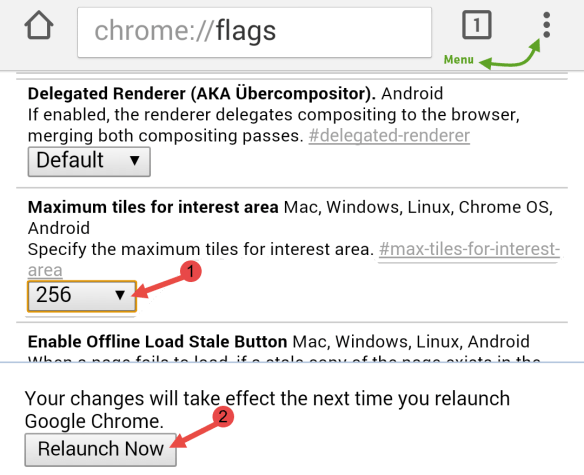
1) Open Google Chrome browser on your Android Device.
2) In the Address bar, type chrome://flags and hit enter.
3) This will take you a hidden menu with lot of settings.
4) Now go to Menu >> Find in page. Here search for tiles.
5) In Maximum tiles for interest area, you’ll see a Default option.
6) Now update it to 256 or 512.
7) It’ll ask you to re-launch your browser. That’s it.
If you’re a new Android, Smartphone user and don’t know the hidden secrets of Chrome browser for Android, then don’t worry about that. This simple trick can help you a lot to increase your browser speed with better scrolling and navigation even in multiple tab browsing. Try it now and share your point of view with us.