
Everyone wants to make money. If you are interested in online business, then blogging is the best source for you. When we talk about blogging, there are mainly two choices come to our mind. One is Blogger’s blog (which is free) and another one is WordPress. WordPress is also free, but we need to buy a hosting package for it.
In a Blogger’s blog, you don’t have full control of your blog. But, in self-hosted WordPress blog, you have the full-right to control your blog. If you are new in blogging field and want to take a drive on a WordPress blog, then here is the tutorial for you, that how to create a WordPress website for free with unlimited hosting space.
Create a free WordPress blog with Free Hosting
Follow the below procedure to create your own blog or free within few minutes.
1) Register on Myspan.in.
2) In the Registration form, fill all your details and choose your plan as “Unlimited”. It’ll give you unlimited free space and bandwidth.
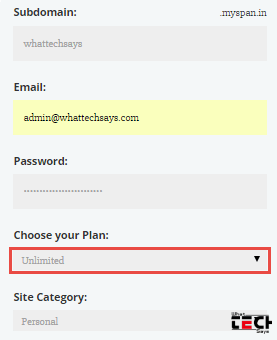
3) After filling all fields, click on the REGISTER button.
4) Now go to your mail inbox and verify your registration.
5) After verification, you’ll get your cPanel details.
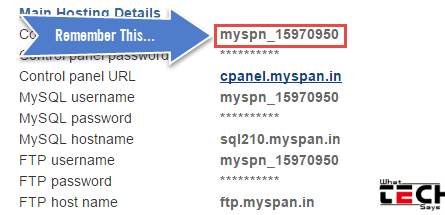
6) Login here with your details.
Install WordPress
1) In cPanel, click on the Softaculous image under the Announcements tab in your panel or you can go through “Software/Services” section.
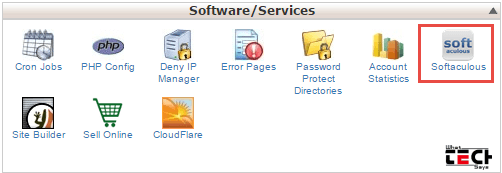
2) Install WordPress from the top of the script.

3) Make sure to leave “In Directory” as empty, if you want to install in the root directory.
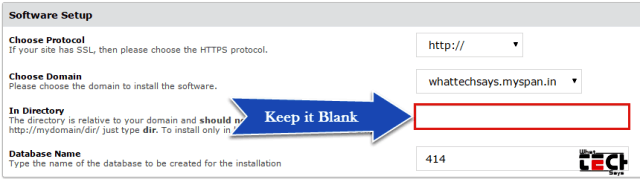
4) Next, put your admin username, password and email id.
5) Enable “Limit Login Attempts” plugin to protect your site from unauthorized access attempts.
6) In “Advanced Options“, enable every option by ticking on them.
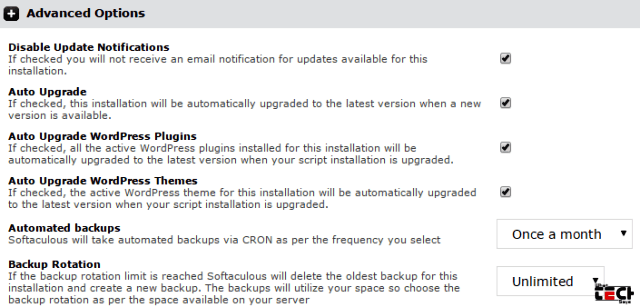
7) Select your desired theme and click on Install button.
8) After successful installation, you’ll get your WordPress website URL.
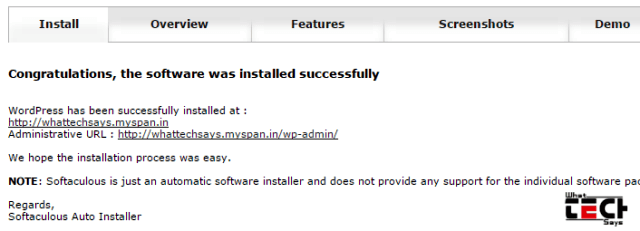
9) Go to your WordPress dashboard by going “yourblog.myspan.in/wp-admin” and login there with your username and password.
Add your Own Domain name
If you already have a domain name and you want to host you WordPress blog with that domain, then click on “Addon Domains” from “Domains” section. Now put your that name and click on “Add domain” button. After that change your domain name servers to ns1.myspan.in and ns2.myspan.in.
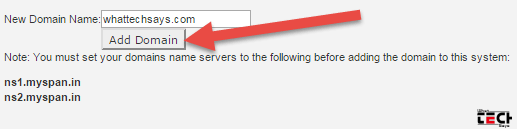
If you want to create a free website with a free domain, then go to cu.cc registration page and grab a free domain for your WordPress hosting.
Conclusion
This web hosting is not for professional bloggers. If you want to learn WordPress or you are a beginner then you can take a drive on it with free unlimited hosting.